Photography Genre
11 Best Free RAW Photo Editors: A Photographer's Pick


Vasundhara Mukherjee
TL;DR
Photon is a strong choice for beginners who want to learn RAW editing with the help of an AI Coach.
RawTherapee is a powerful open-source option for photographers who want detailed RAW processing.
darktable is best for photographers who want advanced editing and photo management in one workflow.
Affinity is now a completely free professional creative suite with photo-editing capabilities.
Snapseed is one of the easiest options for editing RAW photos on a phone.
digiKam is particularly useful if organising a large photo library is as important as editing.
Darkroom is a good fit for photographers who work primarily within Apple's ecosystem.
Photopea is useful if you want to work in a browser without installing software.
Polarr is suited to quick, AI-assisted edits, although some features require a paid plan.
VSCO is best for creative, film-inspired editing rather than detailed RAW processing.
fylm.ai focuses on colour grading and works better as a specialist tool than a complete RAW workflow.
Whether you're editing your first RAW file or looking for an alternative to expensive editing software, finding the right editor can be surprisingly difficult.
"Free" can mean completely free, freemium, free early access, or simply a trial that eventually asks you to pay.
And not every app below is a full Lightroom-style RAW workflow. I've also included mobile, browser-based, and specialist tools that can work with RAW files because the best option depends on where and how you edit.
This guide compares the editors based on their RAW capabilities, editing tools, platforms, workflow features, AI capabilities, and learning curve, rather than hands-on testing.
Best Free RAW Photo Editors at a Glance
Editor | Truly free? | Platforms | RAW workflow | Batch editing | Library | Local masks | AI | Learning curve | Best for |
|---|---|---|---|---|---|---|---|---|---|
Photon | Free early access | Windows, macOS | Full | Yes | No | Yes | Yes | Low | Learning RAW editing |
RawTherapee | Yes | Windows, macOS, Linux | Full | Yes | No | Yes | No | High | Open-source RAW processing |
darktable | Yes | Windows, macOS, Linux | Full | Yes | Yes | Yes | Limited | High | Power users |
Affinity | Yes | Windows, macOS | Full | Limited | No | Yes | Via Canva AI for eligible users | Medium | Professional editing |
Snapseed | Yes | Android, iOS | Mobile RAW | No | No | Yes | Limited | Low | Mobile editing |
digiKam | Yes | Windows, macOS, Linux | Full | Yes | Yes | Limited | No | Medium | Photo organisation |
Darkroom | Freemium | macOS, iOS | Full/mobile | Yes | Apple Photos | Yes | Limited | Low | Apple users |
Photopea | Freemium | Web | Basic RAW development | No | No | Yes | Limited | Medium | Browser editing |
Polarr | Freemium | Windows, macOS, Web, Android, iOS | RAW support | Limited | Limited | Yes | Yes | Low | AI-assisted edits |
VSCO | Freemium | Android, iOS | Basic RAW | Limited | Limited | Limited | Yes | Low | Creative mobile edits |
fylm.ai | Freemium | Web | Specialist | Limited | No | Limited | Yes | Medium | Colour grading |
Note: "Free" isn't one category. Open-source editors such as RawTherapee and darktable are genuinely free to use. Freemium apps provide some features without payment but reserve others for paid plans. Photon is currently available through free early access, so I would not label it "truly free" in the table. The original article currently calls Photon "truly free" while also describing it as free early access, which is the contradiction I'd remove.
What Is a RAW Photo Editor?
A RAW photo editor is software that lets you open, process, and edit RAW image files captured by your camera.
Unlike JPEGs, RAW files retain much more information from the camera's sensor, giving you greater flexibility when editing. You can make significant adjustments to exposure, white balance, highlights, shadows, colour, and detail without working from an already processed JPEG.
Your camera captures the scene. A RAW editor gives you control over what that photograph becomes.
RAW vs JPEG
RAW | JPEG |
|---|---|
Contains more original sensor information | Processed inside the camera |
Greater editing flexibility | Less room for major corrections |
More control over highlights and shadows | Less recovery latitude |
Larger file sizes | Smaller file sizes |
Requires RAW-compatible software | Can be viewed almost anywhere |
If you plan to edit your photographs rather than simply share them straight from the camera, RAW gives you considerably more flexibility.
How I Compared These RAW Editors
Every editor in this guide can handle RAW files in some form, but they're built for very different workflows.
I compared the editors based on:
1. RAW file support
Does the software support RAW files from the cameras photographers actually use?
2. Editing capabilities
How much control do you get over exposure, white balance, highlights, shadows, colour, sharpening, noise reduction, lens corrections, and other core adjustments?
3. Workflow
Does the software support batch editing, photo organisation, non-destructive editing, or local adjustments?
4. Platform support
Can you use it on Windows, macOS, Linux, iOS, Android, or directly in a browser?
5. AI features
Where AI is available, I considered what it actually contributes to the editing workflow rather than treating AI as an automatic advantage.
6. Ease of use
How approachable is the editor for someone who is new to RAW editing, and how much room does it leave to grow?
This is a feature-based comparison, not a report of hands-on testing. I haven't personally tested every editor in this list.
1. Photon
Best for: Beginners learning RAW editing
Platform: Windows, macOS
Free type: Free early access
Most RAW editors are built around helping you finish an edit. Photon takes a slightly different approach.
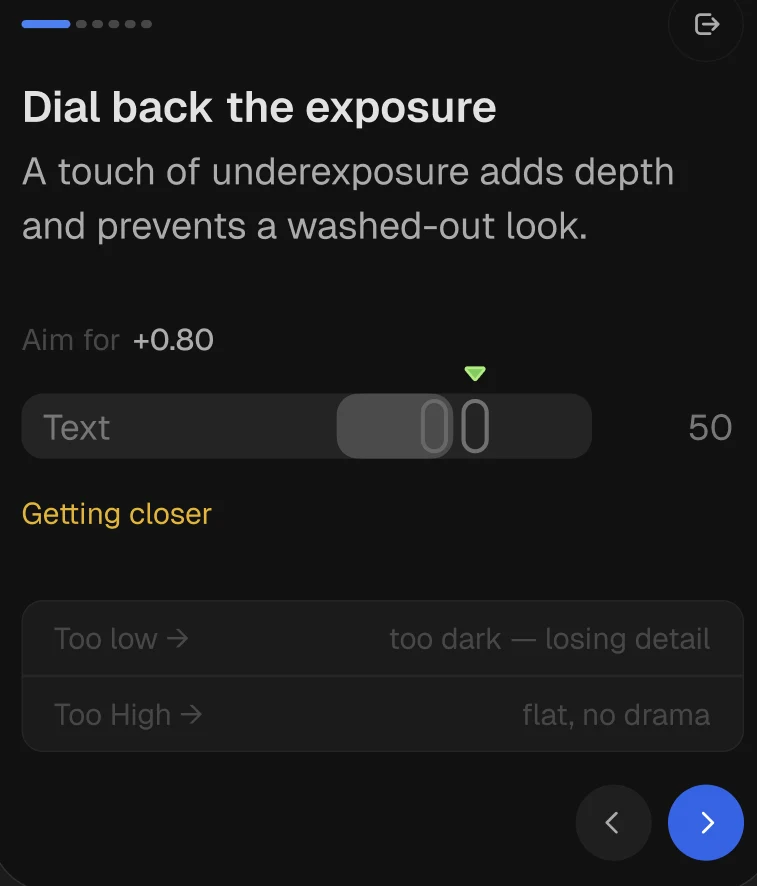
Its AI Coach is designed to explain the adjustments you're making, helping you understand why an image might need changes to exposure, white balance, contrast, or other elements rather than simply applying an automatic edit.
That makes it particularly interesting for photographers who are still learning how to edit RAW files.
If you've ever opened a flat RAW image and thought, where do I even start?, the idea is to turn that editing process into part of the learning experience.
Photon also uses a non-destructive workflow and is designed around a relatively approachable interface.
What stands out
AI Coach explains edits as you work
Designed with learning in mind
Non-destructive editing
Beginner-friendly interface
Windows and macOS support
What to keep in mind
Currently available through free early access
Camera support and features are still evolving
Better suited to photographers who want to understand their edits rather than simply automate them
Bottom line: If you're new to RAW editing and want software that helps explain the editing process, Photon is an interesting place to start.
2. RawTherapee
Best for: Open-source RAW processing
Platform: Windows, macOS, Linux
Free type: Truly free, open source
RawTherapee is one of the strongest options if you want detailed RAW processing without paying for software.
It gives you extensive control over exposure, white balance, colour, sharpening, noise reduction, lens correction, and other aspects of RAW development.
The trade-off is the interface.
RawTherapee is powerful, but it isn't particularly interested in holding your hand. If you're completely new to RAW editing, the number of controls can feel overwhelming.
For photographers willing to learn the workflow, though, it offers considerable control without a subscription.
What stands out
Completely free and open source
Advanced RAW processing
Batch processing
Strong control over colour and detail
Windows, macOS, and Linux support
What to keep in mind
Steeper learning curve
Interface can feel overwhelming
No full photo library management system
Bottom line: RawTherapee is one of the best choices if your priority is powerful, free RAW processing and you don't mind learning the software.
3. darktable
Best for: Power users
Platform: Windows, macOS, Linux
Free type: Truly free, open source
darktable is probably the closest option on this list to a free Lightroom-style workflow.
It combines RAW development with digital asset management, allowing you to import, organise, rate, tag, edit, and export photographs from the same application.
Its editing tools are extensive, including masking, local adjustments, colour tools, lens correction, and non-destructive editing.
The downside is complexity.
There are a lot of modules, and understanding how everything fits together takes time.
What stands out
Free and open source
RAW processing and photo management
Powerful masking and colour tools
Non-destructive workflow
Large-library support
What to keep in mind
Steep learning curve
Interface can feel intimidating initially
Better suited to desktop users
Bottom line: If you want a powerful free workflow and don't mind investing time in learning it, darktable is one of the strongest options available.
4. Affinity
Best for: Professional image editing without a subscription
Platform: Windows, macOS
Free type: Truly free
This is one place where the original article needs a significant update.
Affinity is no longer a free trial product. Canva announced the all-new Affinity as a completely free professional creative application, combining photo editing, vector design, and page layout tools.
For photographers, its photo-editing capabilities include RAW development alongside professional retouching, compositing, masking, layer-based editing, and other advanced tools.
It's a different proposition from Lightroom. Affinity isn't primarily designed around managing a large photo catalogue. It's more focused on working deeply on individual images.
What stands out
Completely free
Professional photo-editing tools
RAW development
Layer-based editing
Windows and macOS
What to keep in mind
Not a Lightroom-style photo catalogue
More complex than beginner-focused editors
The current Affinity product is broader than the older Affinity Photo application
Bottom line: If you want professional photo-editing capabilities without a recurring subscription, Affinity deserves a place on this list.
5. Snapseed
Best for: Free mobile RAW editing
Platform: Android, iOS
Free type: Truly free
If you prefer editing on your phone, Snapseed remains one of the easiest places to start.
It offers exposure, white balance, contrast, highlights, shadows, curves, selective adjustments, and other editing tools in a relatively straightforward interface.
And this section needs updating too. Snapseed's latest iOS release has expanded RAW support substantially, with the App Store now describing support for a much larger range of RAW formats.
That makes the old wording around its RAW support unnecessarily limiting.
Snapseed still isn't a replacement for a desktop RAW workflow. But that's not really what it's trying to be.
What stands out
Completely free
RAW support on mobile
Beginner-friendly interface
Selective editing tools
No subscription
What to keep in mind
Mobile only
Not designed for large photo libraries
Less suited to complex desktop workflows
Bottom line: If you want to edit RAW files on your phone without paying for an app, Snapseed is one of the strongest choices.
6. digiKam
Best for: Photo organisation
Platform: Windows, macOS, Linux
Free type: Truly free, open source
Editing is only part of managing a growing photography library.
If you have tens of thousands of photographs, finding the right image can become almost as important as editing it.
That's where digiKam stands out.
It combines photo management with RAW processing and gives you tools for albums, folders, keywords, ratings, colour labels, geotags, metadata, and more.
Its editing tools aren't as deep as RawTherapee or darktable, but its organisation capabilities make it useful for photographers with large collections.
What stands out
Free and open source
Excellent library management
Metadata support
Handles large collections
Built-in RAW processing
What to keep in mind
Editing isn't as advanced as dedicated RAW processors
Interface feels more functional than modern
Takes time to learn
Bottom line: Choose digiKam if managing your library is as important to you as editing your photographs.
7. Darkroom
Best for: Apple users
Platform: macOS, iOS
Free type: Freemium
Darkroom is designed around the Apple ecosystem and works directly with Apple Photos.
That makes it particularly convenient if your photographs already live across your iPhone, iPad, and Mac.
The interface is approachable, and the editing experience is designed to feel native to Apple devices.
The catch is that some advanced features require Darkroom+.
What stands out
Apple ecosystem integration
RAW editing
Mobile and desktop support
Clean interface
Library integration
What to keep in mind
Apple devices only
Some advanced features are paid
Not designed to replace every professional desktop workflow
Bottom line: If your entire photography workflow revolves around Apple devices, Darkroom is worth considering.

8. Photopea
Best for: Browser-based editing
Platform: Web
Free type: Freemium
Photopea is useful when you don't want to install another application.
It runs in a browser and has an interface that will feel familiar to anyone who has used Photoshop. You get layers, masks, adjustment tools, and other image-editing capabilities.
It's important to distinguish Photopea from a dedicated RAW processor.
Its RAW support is useful, but it's better suited to individual-image editing, retouching, compositing, and design than managing a large RAW library.
What stands out
Works directly in a browser
No installation
Layer and masking tools
Familiar Photoshop-style workflow
Works across operating systems
What to keep in mind
Not a full RAW management workflow
Better for individual images than large batches
Free version includes limitations
Bottom line: Photopea makes the most sense when convenience is more important than having a complete desktop RAW workflow.
9. Polarr
Best for: Quick AI-assisted edits
Platform: Windows, macOS, Web, Android, iOS
Free type: Freemium
Polarr takes a more modern, quick-editing approach.
Its interface is designed to make common adjustments accessible without requiring you to understand every technical control inside a traditional RAW processor.
AI-powered tools can speed up tasks such as masking and enhancement.
The catch is that many of the more advanced features require a paid plan.
What stands out
Modern interface
Desktop, mobile, and web availability
AI-assisted editing
Fast workflow
Accessible for beginners
What to keep in mind
Freemium rather than completely free
Some advanced tools require payment
Less control than dedicated RAW processors
Bottom line: Polarr makes sense if speed and accessibility matter more to you than having granular control over every part of the RAW workflow.
10. VSCO
Best for: Creative mobile looks
Platform: Android, iOS
Free type: Freemium
VSCO isn't really a traditional RAW processor, and it doesn't need to be.
Its strength is creative editing, particularly its film-inspired presets and visual styles.
The app also supports RAW editing on compatible devices, but if your priority is detailed highlight recovery, advanced masking, or extensive RAW development, a dedicated editor will serve you better.
VSCO is more interesting when the question is: "How do I want this photograph to feel?" rather than: "How do I extract every bit of information from this RAW file?"
What stands out
Film-inspired presets
Simple interface
Mobile workflow
Creative editing tools
RAW support on compatible devices
What to keep in mind
Not a dedicated RAW workflow
Many premium tools require a subscription
Better for creative editing than technical RAW processing
Bottom line: VSCO remains a strong option if creative looks matter more to you than comprehensive RAW processing.
11. fylm.ai
Best for: Colour grading
Platform: Web
Free type: Freemium
fylm.ai occupies a slightly different position from most of the editors on this list.
Rather than trying to be a complete RAW editing application, it focuses on colour grading and creating consistent colour across images.
Its AI-assisted tools can help analyse colour relationships and build cohesive looks.
That makes it more of a specialist tool than a direct replacement for something like Lightroom, RawTherapee, or darktable.
What stands out
AI-assisted colour grading
Colour matching
Web-based workflow
Useful for creating consistent looks
What to keep in mind
Not a complete RAW editing workflow
Requires an internet connection
Some advanced capabilities are paid
Bottom line: If colour grading is your priority, fylm.ai is worth exploring. If you need a complete RAW workflow, look elsewhere on this list.
Which Free RAW Editor Should You Choose?
The right editor depends less on the number of features and more on where and how you edit.
If you want to... | Choose |
|---|---|
Learn RAW editing with guidance | Photon |
Get powerful open-source RAW processing | RawTherapee |
Have an advanced free Lightroom-style workflow | darktable |
Get professional photo-editing tools for free | Affinity |
Edit RAW photos on your phone | Snapseed |
Organise a large photo library | digiKam |
Edit within Apple's ecosystem | Darkroom |
Edit without installing software | Photopea |
Make quick AI-assisted edits | Polarr |
Create film-inspired mobile edits | VSCO |
Focus specifically on colour grading | fylm.ai |
You don't necessarily need to pick one and stick with it forever. A photographer might use digiKam for organisation, another editor for RAW development, and a specialist tool for colour grading.
The important thing is finding a workflow that fits the way you actually work.
What to Look for in RAW Editing Software
Rather than choosing software based on which features make one particular product look best, I'd look at the fundamentals.
1. RAW file support
First, make sure the editor supports your camera's RAW files.
This sounds obvious, but camera support varies, particularly with newer camera models. Check compatibility before committing to a workflow.
2. Editing controls
At minimum, look for control over:
Exposure
White balance
Highlights and shadows
Contrast
Colour
Sharpening
Noise reduction
Lens corrections
Cropping and straightening
More advanced photographers may also want masking, curves, colour grading, and local adjustments.
3. Batch editing
If you regularly photograph weddings, events, travel, or large shoots, batch editing can save significant time. It's much less important if you typically edit a handful of individual photographs.
4. Photo organisation
Some photographers need a full library while others keep their photographs organised in folders and only need an editor. Neither approach is inherently better. But the important thing is knowing which one fits your workflow.
5. Non-destructive editing
A non-destructive workflow lets you make adjustments without permanently changing the original RAW file. That gives you the freedom to revisit an image later and change your mind.
6. Local adjustments and masking
Global adjustments affect the entire photograph. Local adjustments let you work on specific areas, which becomes increasingly useful as your editing gets more sophisticated.
7. AI features
AI can be useful for things like masking, noise reduction, selection, and other repetitive tasks. But AI shouldn't automatically be treated as a reason to choose one editor over another. Look at what the feature actually does and whether it improves your workflow.
8. Learning curve
Powerful software isn't automatically better software for you. If you're new to RAW editing, an interface you understand is likely to be more useful than one with 200 controls you'll never touch.
Free vs Paid RAW Photo Editors
Free RAW editing software has come a long way. RawTherapee and darktable, for example, provide substantial RAW processing capabilities without a subscription.
But paid software can still offer advantages, particularly around advanced AI tools, workflow integrations, cloud syncing, noise reduction, masking, and overall polish.
The question isn't simply: "Is paid software better?" It's: "Are the additional features worth paying for in my workflow?"
If you're just learning photography, you probably don't need every advanced feature available.
Learning how exposure, white balance, colour, contrast, and composition work will have a much bigger impact on your photographs than buying the most expensive editor.
The Bottom Line
The best free RAW photo editor isn't necessarily the one with the longest feature list. It's the one that fits the way you photograph.
If you're new to RAW editing, Photon is worth considering if you want an editor that helps you understand your decisions rather than simply automate them.
If you want maximum control without paying, RawTherapee and darktable are strong choices.
If you're editing on your phone, Snapseed is an obvious option. If you're deeply invested in Apple devices, Darkroom may fit more naturally into your workflow.
And if what you really need is professional image editing rather than a traditional photo-management workflow, Affinity is now a particularly interesting option because the current version is completely free.
The good news is that you don't have to decide based on a feature table alone. Try a few editors with the same RAW file and see which workflow makes sense to you.
The right editor should eventually become invisible. You should be thinking about the photograph, not fighting the software.
FAQs about the best free RAW editor
What's the best free RAW photo editor?
For desktop RAW editing, Photon and RawTherapee are two of the strongest completely free options. RawTherapee focuses heavily on RAW processing, while Photon combines RAW photo editing with Smart Guidance to explain edits.
Can I edit RAW photos without Adobe Lightroom?
Absolutely.
Editors like Photon, RawTherapee, darktable, digiKam, and Snapseed all support RAW editing, allowing you to adjust exposure, white balance, colour, and detail without paying for Adobe's subscription plan.
Which free RAW editor is best for beginners?
If you're editing on your phone, Snapseed is the easiest place to start.
Its interface is clean, intuitive, and focuses on the adjustments you'll use most often.
For desktop users, Photon, darktable and RawTherapee are more powerful. Photon is has the simplest UI so there’s no learning curve, but the other two require more time to learn.
Are free RAW photo editors good enough for professionals?
They can be. The software itself is rarely the limiting factor. Your understanding of exposure, colour, and editing technique has a much greater impact on the final image.
What's the difference between a RAW editor and a JPEG editor?
A RAW editor works with the original data captured by your camera's sensor, giving you significantly more flexibility when making adjustments.
JPEG editors work with files that have already been processed and compressed by the camera, leaving much less room to recover detail or make significant exposure changes.
Can I edit RAW photos on my phone?
Yes. Apps like Snapseed support RAW editing on both Android and iPhone, making it possible to adjust exposure, white balance, highlights, and shadows without transferring your photos to a computer.
Made for photographers learning in public.